Hey there, welcome back!
No long gap this time. This is Part 2 of the story I started in Part 1, the data collection post. That one ended with about 2 hours of qualified teleop data on my Elite Robotics CS66. This one is about what happened when I trained on it and put the model back on the arm.
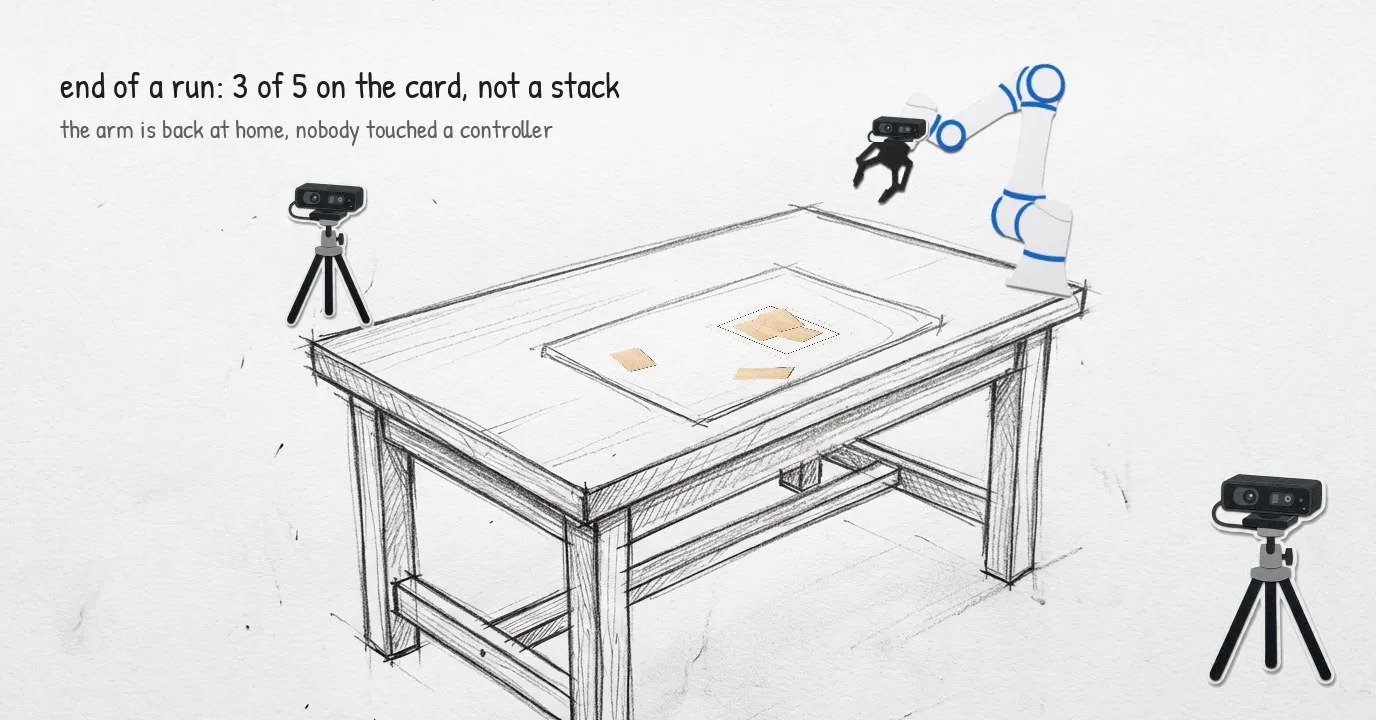
Result first, so nobody reads to the end expecting a miracle: the arm picks up the first jenga block on its own and places it on the target card, almost square to the drawn rectangle. The second block is where it falls apart. It does not stack yet.
That is less than I hoped for and more than I expected. And almost everything I learned came from the gap between “the model is trained” and “the arm does something sensible”.
One thing before we start. This was my first time deploying a model on a real robot, and I did not do it alone. So a big thanks to Vishal Thakran, a colleague who is good at exactly this kind of work. He ran the training with me and was there at almost every step after it, from the first replay to the last run. A lot of what reads below as “I figured out” was really the two of us at the rig, and I learnt more in these few days than in weeks of reading, most of it from watching how he approaches a problem.
The Training, Quickly
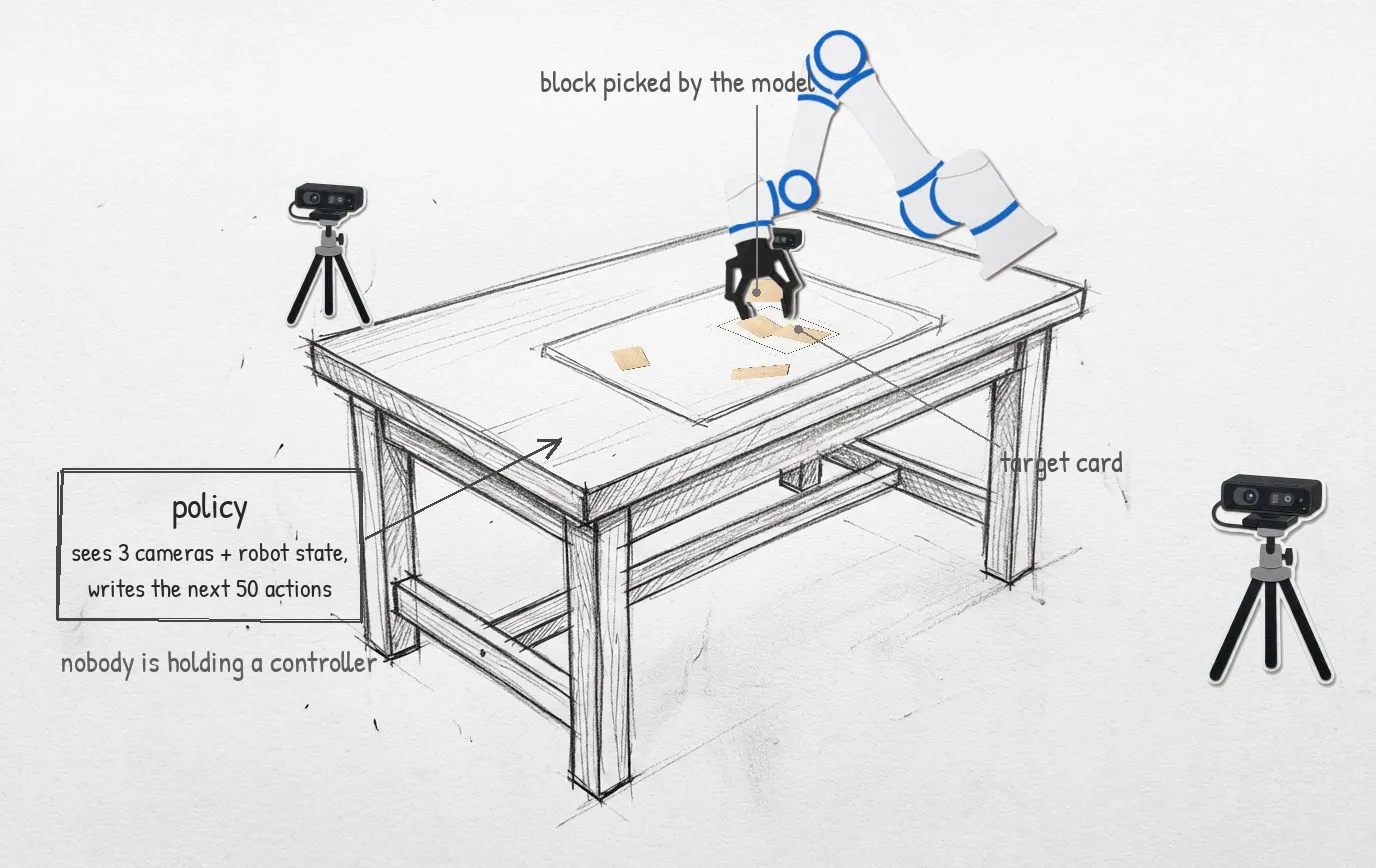
The task is one sentence: “Stack 5 pieces of jenga”. Five blocks scattered on the table, one card with a drawn rectangle, stack them on it.
- Model:
Pi0, fine tuned withLeRobot. - Method: LoRA (rank 32) on the action expert, with the small input and output projection layers trained in full. The vision encoder stays frozen.
- Run: 30,000 steps, batch size 16, a checkpoint every 5,000 steps.
- Input: three camera images and 14 numbers of robot state (tool position, orientation, six joint angles, gripper open or closed).
- Output: a chunk of 50 future actions, which at 30 Hz is about 1.7 seconds of motion.
If you read the earlier posts you’ll notice the plan was Pi0.5, and this is Pi0. That was deliberate, and the reason is not model size: the two are almost the same size, both sitting on the same 3B backbone. The difference is what they’re built for. Pi0.5 is made for diverse tasks and better generalisation, and it wants a lot more varied data to show that off. Pi0 is the more task-oriented of the two and does well on a single structured task, which is exactly what “stack five blocks on a card” is.
So Pi0 is the baseline. With 2 hours of data and limited compute, I didn’t want to burn resources on Pi0.5 before knowing whether my data, my export and my deployment code even work end to end. If Pi0 can pick up a block from my recordings, the pipeline is sound. Now that it does, shifting to Pi0.5 is the next step, not a gamble.
LoRA matters here for a practical reason. The base model is a 14 GB download, and the adapter on top of it is small. I can keep six checkpoints around and swap between them without filling the disk.
On an RTX 4080 the model takes about a minute to load and uses roughly 10 GB of VRAM. One chunk takes 0.2 to 0.4 seconds to compute. So the model is not the slow part. The arm is.
A Simulated Twin First
I did not want the first test of a brand new policy to be on a real arm with a real gripper next to a real table. So before anything else there was a simulated copy of the rig in Gazebo:
- the same arm and the same
Robotiq 2F-85 - three cameras at the calibrated positions, with the real cameras’ intrinsics
- blocks of the right size, on a table at the right height
- 127 block layouts taken from the first frames of real episodes, so every reset is a scene the model could plausibly have seen
The important part is that the sim speaks exactly the same observation and action format as the dataset. The policy cannot tell which one it is plugged into, and that is the point. Every piece of glue code got exercised before the real arm moved.
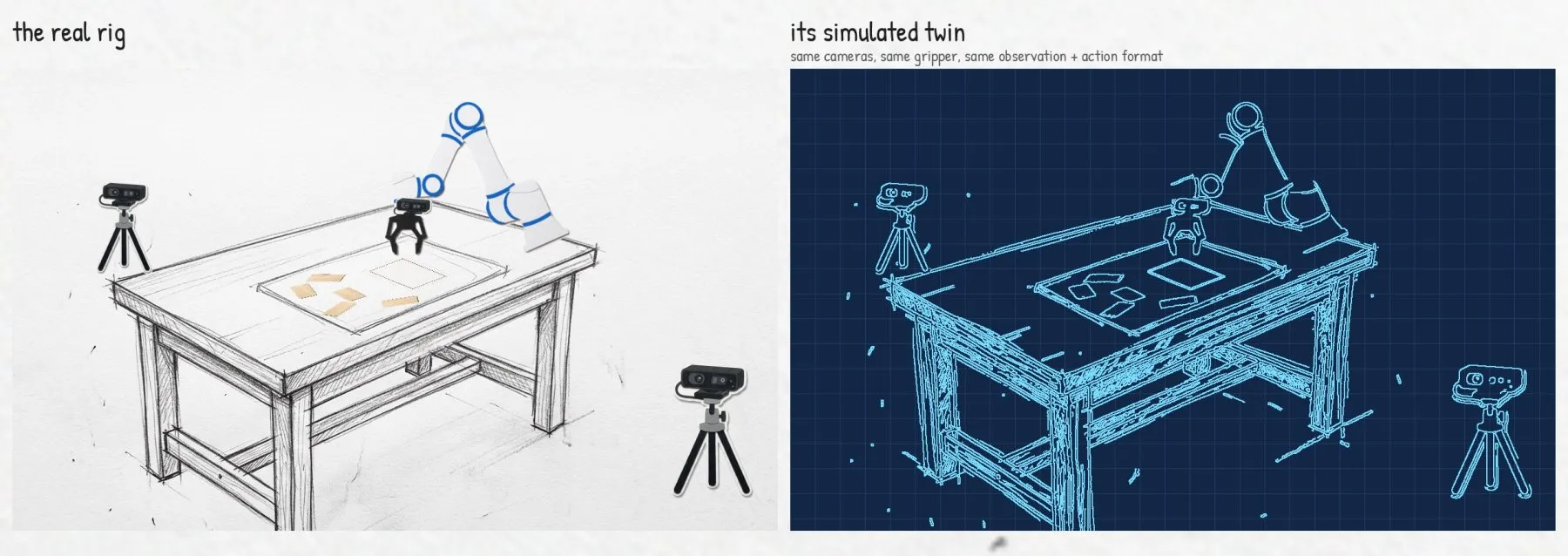
Getting the sim to grasp a block at all took a full session on its own. The short version: I had measured the tool tip from the wrong part of the finger, so the gripper was not closing where I thought it was. Measure from the pad, not from wherever the CAD file happens to put the origin.
The sim verdict on the policy was not great. It went for blocks, sometimes got one, never finished the task. Useful to know before going to the real arm, and a hint of what was coming.
Replay Before Policy
The real deployment has three moving parts:
- A policy server that keeps the model loaded on the GPU and answers “here are the images and state, what next?”
- A small C++ arm server that talks to the CS66 and streams joint targets to it.
- A runner that reads the cameras, asks the policy for a chunk, and feeds it to the arm.
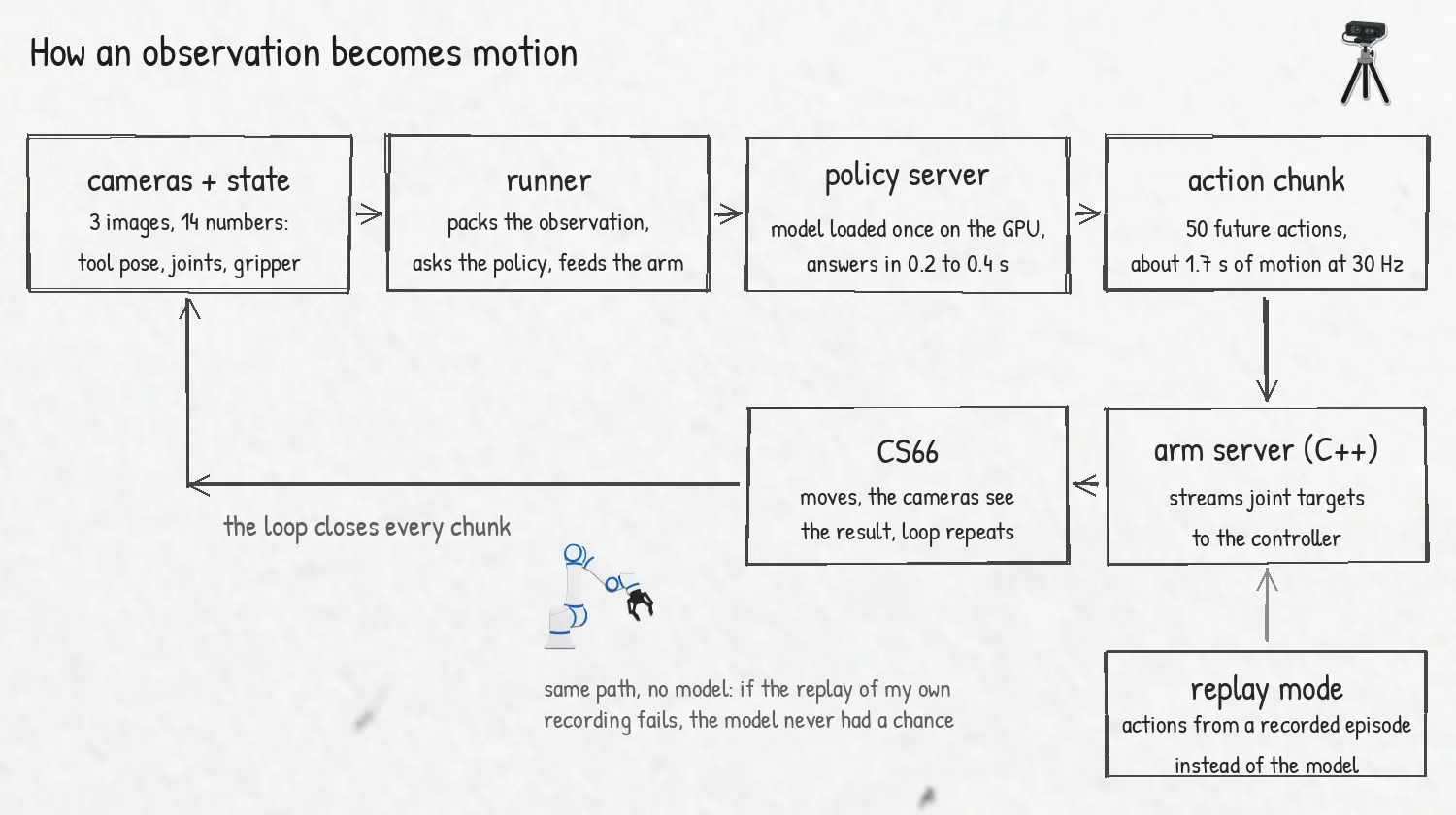
Before letting a model anywhere near this, I did the most useful thing in the whole project: I replayed a recorded episode through it. Same code path, same arm server, same gripper commands, but the actions come from a file I recorded by hand instead of from the model. If the replay does not reproduce the episode, the model has no chance.
The first dry run against a fake arm passed. The first run on the real arm did not.
The First Replay Hit The Table
At full speed, on the very first pick, the arm drove the fingertip into the table. Protective stop. Nothing broke, but that is not a sound you want to hear twice.
The actions were my own recording. I had done that exact motion by hand without touching the table. So what changed?
My theories, in order:
- The inverse kinematics is off. Nope. The joint targets matched the recorded joints to about 0.01 rad.
- The arm server’s speed cap is distorting the path. Real, but small. It could explain 0.1 rad at most.
- The tool length is wrong. It was off, but by 3 mm, and this was a much bigger dip.
What cracked it, again, was looking at raw numbers instead of telling stories. I compared where the arm was told to be with where it actually was at every tick. The arm was lagging the command by up to 0.55 rad.
The cause was the speed slider on the teach pendant. It was sitting at 19%.
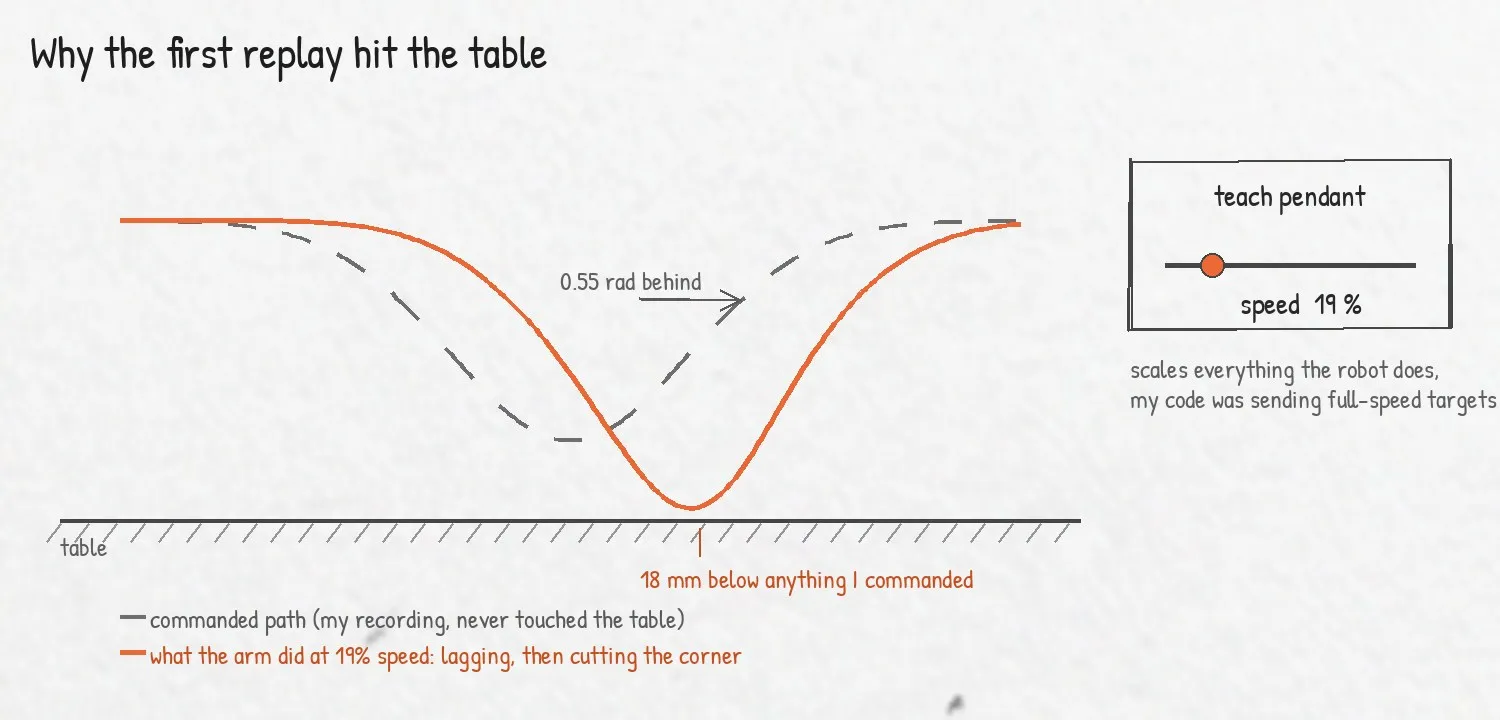
The slider scales everything the robot does. My code was sending targets at full speed, the robot was executing them at a fifth of that, and falling further and further behind. And when an arm that is behind tries to catch up, it does not retrace the path. It takes the shortest route in joint space. That shortcut dipped the fingertip 18 mm below anything I had commanded.
Two fixes:
- The slider goes to 100% before any run, and I check the value the robot itself reports instead of assuming it.
- The runner has a watchdog. If the tip is more than 5 cm from where it was commanded to be, or below the table by more than a few millimetres, it stops.
After that the same replay ran clean. Every gripper open and close landed within 1 to 2 mm of the recording.
A recorded path is only safe if the arm is actually on it. Check where the robot is, not where you told it to go.
Is It The Pipeline Or The Policy?
Then came the model. The first two policy runs, on two different checkpoints, stacked zero blocks. Both went for the block nearest the card and fumbled it.
So we ran it again. And again. Different checkpoints, slower execution, re-planning more often. The arm kept doing the same thing: it clearly knew what it wanted to do, reached for a block, and missed by a few centimetres every single time.
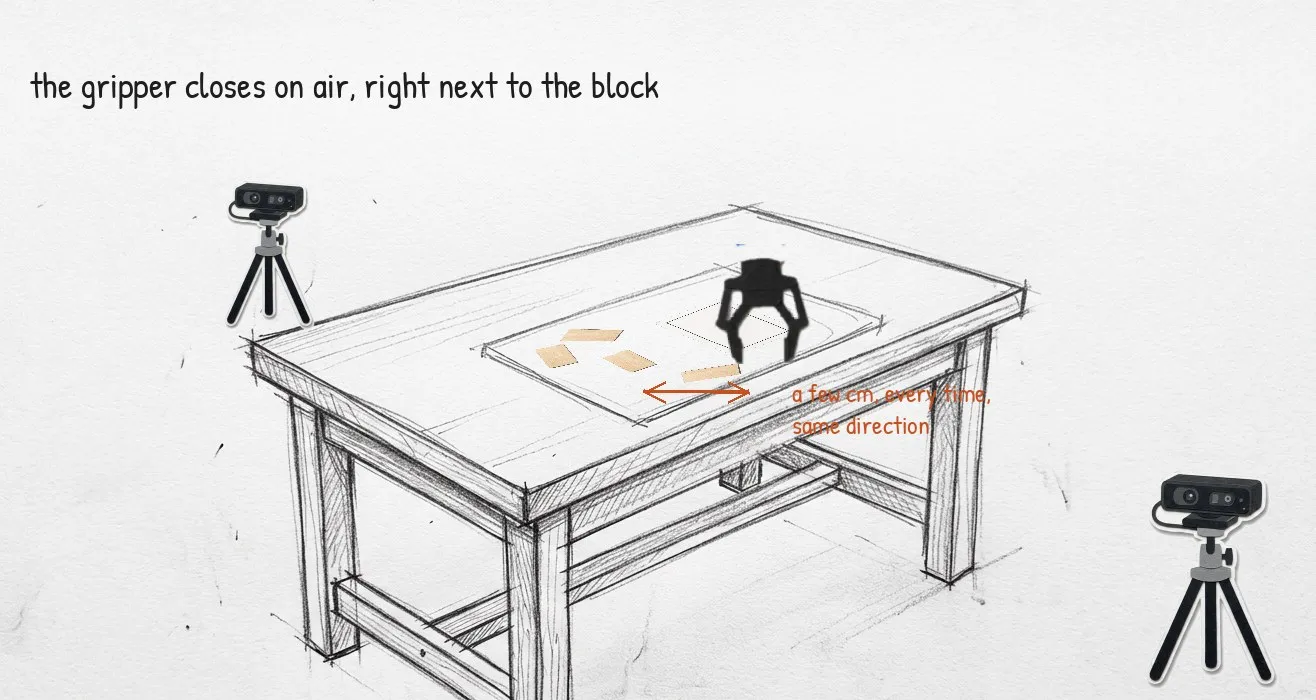
This is the moment where it is very tempting to start changing things at random. Instead I asked a narrower question: is my deployment code feeding the model something different from what it saw in training?
The test is simple. Take an episode from the training set, feed its recorded images and state through the exact deployment code path, and compare what the model predicts with what I actually did in that episode.
- predicted tip position one step ahead: within 7 to 8 mm
- ten steps ahead: within 11 to 17 mm
- gripper open or closed: agreed 96 to 97% of the time, and it closed at the right moment
So the pipeline was faithful. On scenes it had seen, the model knew what to do. On the live scene, it missed. My first conclusion was that this is a generalisation problem, and no amount of deployment code fixes that.
That conclusion was only half right, and the consistency of the miss was the clue.
The Camera That Moved
Every pick and every place was off by a few centimetres, in roughly the same direction, run after run. Random policy weakness does not look like that. A consistent offset means something systematic, so we went through the candidates one by one:
- The arm itself. Already cleared: replay landed within 1 to 2 mm.
- The observation code. Already cleared: the offline check matched.
- The scene. The only thing left that the model sees and that I had not verified.
So I pulled the first frame of a recorded episode and compared it with the live camera view.
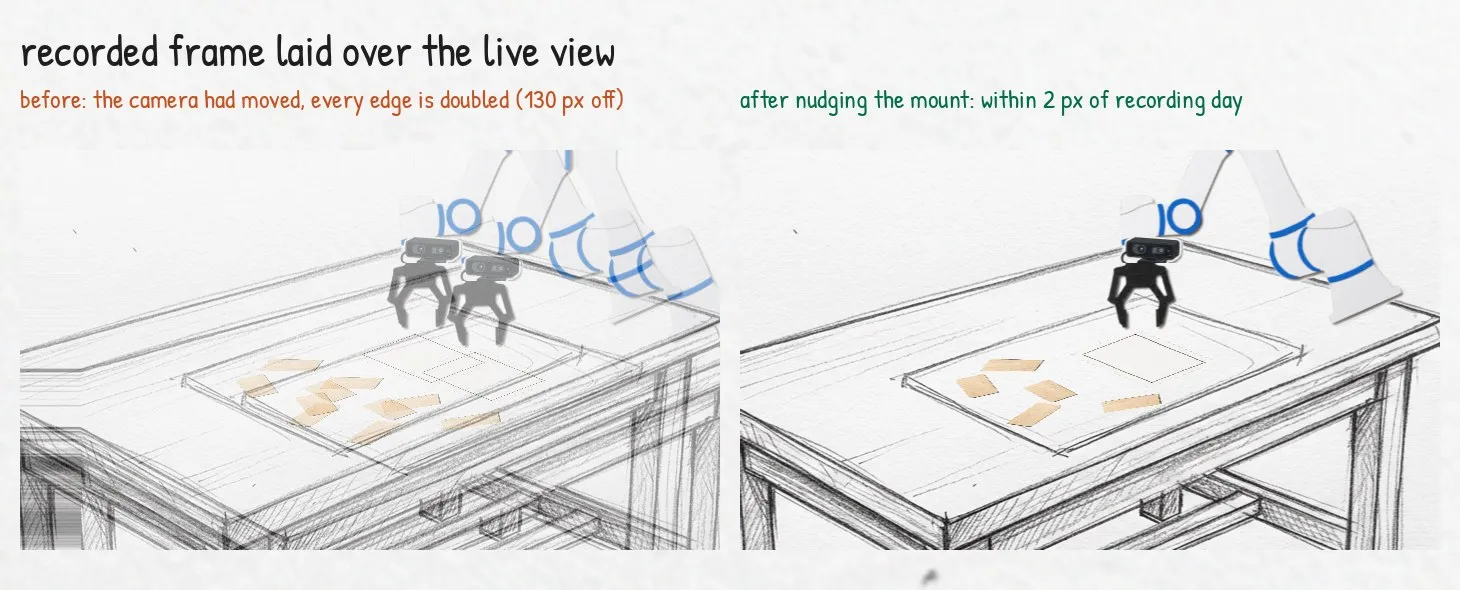
The workspace camera had moved. Not much in the real world, a nudge. But in the image, everything was shifted by more than 130 pixels. The front camera was about 50 pixels off too. Two recorded episodes days apart agreed with each other to under 1 pixel, so it was not noise. The camera had been moved at some point after the data was collected.
This is the thing I understood in theory and had never felt before. The model has no idea where the table is. It has pixels. If a block appeared at a certain spot in the image during training, the model learned to send the arm to a certain place. Move the camera, and the same block shows up at a different spot in the image, and the arm confidently goes to the wrong place.
The fix was to put the cameras back exactly where they were during recording, and “by eye” is nowhere near good enough for that. So I wrote a small alignment tool:
- Take the first frame of a recorded episode as the reference for each camera.
- Compare it with the live camera view and work out how far the picture has shifted, in pixels, and in which direction.
- Show the reference as a see-through overlay on the live feed, and nudge the camera by hand until the two line up and the shift reads close to zero.
Before trusting it on the arm I tested the tool on two recorded episodes from different days. They agreed to under 1 pixel, so the method itself was sound. Then the reference against the live view, and the workspace camera ended up within 2 pixels of where it was on recording day.
While I was in there, the same hunt for mismatches turned up three more:
- The tool was 3 mm short. My kinematic model of the arm disagreed with the controller’s by 3.1 mm at the flange. Small, but the state I fed the model was not quite the state it trained on.
- The home pose was different. The config’s home position was not where my recorded episodes actually started. The runner now reads the start pose from an episode.
- The card was rotated 90 degrees. In every recording the long side ran left to right. I had put it down the other way.
After fixing all four, the run was significantly better. The same checkpoint that stacked zero blocks now hovered over the first block, picked it up and released it on the card, parallel to the drawn rectangle, missing a perfect fit only at the boundary. Honestly, I did not expect it to get even that far.
Then it goes for a second block, and that is where it falls apart. Most of the time it misses the pick or never closes on it. Once, it picked the second block cleanly, carried it over the first and tried to place it on top, and the stack did not hold.
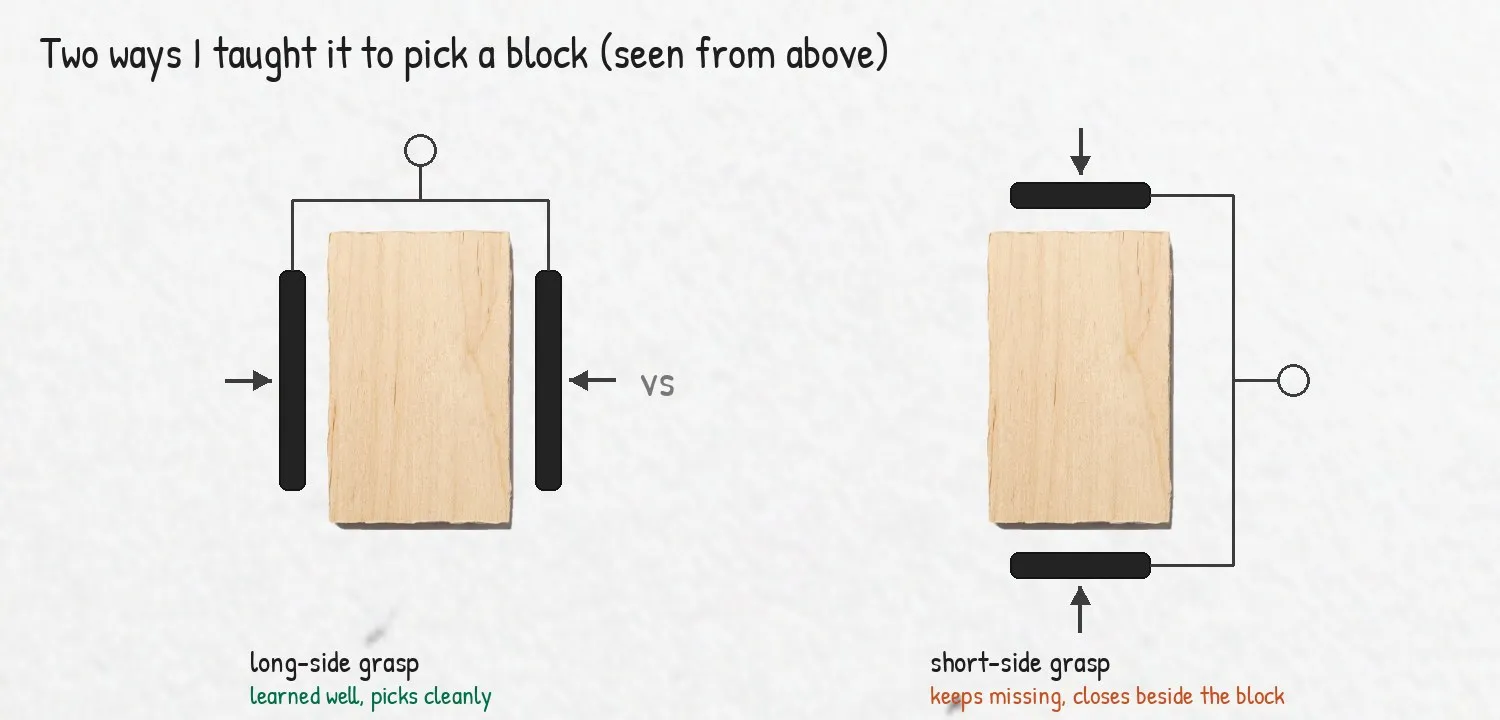
One detail I only noticed watching the failures. I had taught it two ways of picking a block in the recordings, from the long side and from the short side. The long-side grasp it learned well. The short-side grasp is the one it keeps messing up. With this little data, two variations of the same move was one too many. I realised afterwards that I should have taught it a single picking style and nothing else until the dataset was big enough to carry variations.
The model sees pixels, not coordinates. Move the camera and you have moved the world.
A few smaller ones from the same period, for flavour:
- Two models, one GPU. Switching checkpoints crashed with out of memory, because the server loaded the new model before letting go of the old one. Two copies of Pi0 do not fit in 16 GB.
- The run that did nothing. After a protective stop the robot refuses new motion scripts for a few minutes. The runner would count down, start, and the arm would just sit there. It now checks first and fails loudly.
- The stop and go arm. Waiting for each chunk to finish before computing the next gave a visible pause every 1.7 seconds. Computing the next chunk while the current one is still executing removed it, and re-planning every 25 actions instead of every 50 made the arm react to what it had just done.
Where I’m At
The deployment pipeline is something I trust now. Replay reproduces recordings to the millimetre, the model’s predictions on training episodes match what I did, and there is a watchdog between the policy and the table.
The policy itself is the weak part. One block placed well, a second one attempted, no stack. Some of that is camera placement accuracy, which I can tighten. Most of it is simply the amount of data. Two hours from one camera setup, on one table, is nowhere near enough, and my guess is it needs at least 500 episodes before it picks and places reliably and starts to stack. The proof of concept is done. The accuracy is far behind.
What I’d do differently, and what comes next:
- Lock the cameras down before recording a single episode, and save a reference frame per camera on day one.
- Vary the scene on purpose while collecting: card position, lighting, block layouts. I collected clean data. I should have collected varied data.
- More data. No way around this one. 500 episodes is my working number for the next round.
- One grasp, not two. Pick a single way to grab a block and record only that until the data is big enough to support variations.
Same honesty as last time about Claude: a lot of this code, including the test and alignment scripts, was written with it, and the debugging went faster because of it. But the speed slider and the moved camera were not found by any tool. I found them by standing next to the arm and looking at what it actually did.
If you’re deploying a VLA on your own arm and your policy is “almost” working, check your cameras first. And if you have ideas on getting from one block to a stack, I’d love to hear them. You can contact me here.
Thanks for reading!
See you in the next one.