Hey there, it’s been a while!
Long gap since the last post. Between intern work and going down the rabbit hole of Physical AI models on the side, writing kept slipping. There are just so many models to read about right now, each with its own pros and cons, and it’s very easy to lose a weekend comparing them instead of doing the actual work.
Small confession before we start: this post is late. I meant to publish it right when the data collection phase wrapped up, but the work kept moving faster than the writing. By the time I sat down to finish it, I had already trained on this data and deployed the model back on the arm. So you’re getting two posts at once:
- Part 1, this one: the data collection phase for my
Elite Robotics CS66cobot. - Part 2: training and deployment, which picks up exactly where this ends.
I’ve kept this post the way I’d have written it back then, because the story makes more sense in order.
If you read the first post, you know the plan: teleoperate the arm with a Meta Quest 3, record what I do, and use that to fine tune a VLA like Pi0.5. Last time the pipeline was “almost done”. This time I actually have data. Here’s how it went.
The Setup, Quickly
Simple to describe, annoying to get right:
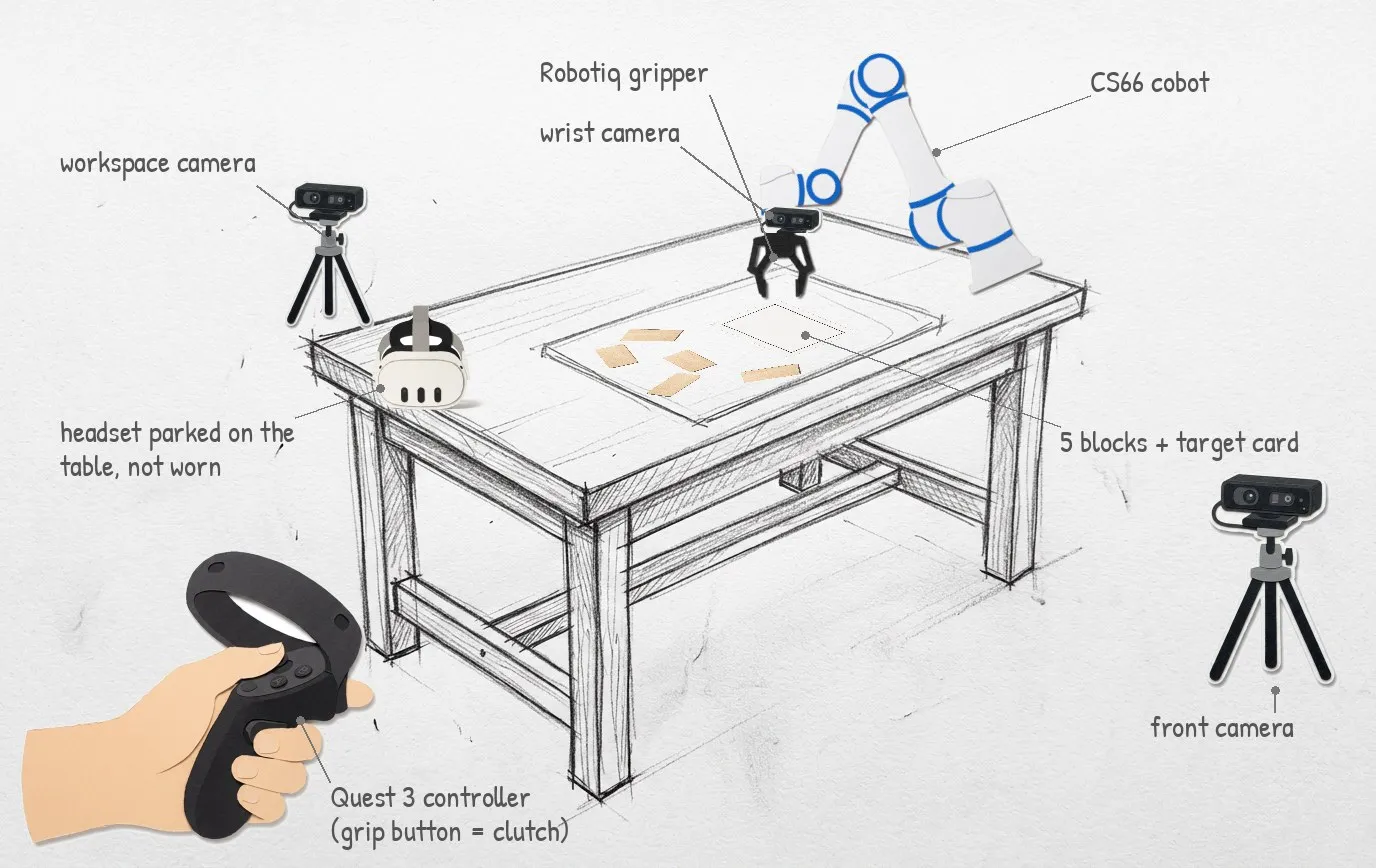
- Input: I hold a Quest 3 controller. The headset streams the controller’s position and rotation to a PC over USB.
- Control: a small C++ loop on the PC turns that into motion commands for the CS66 at 125 Hz.
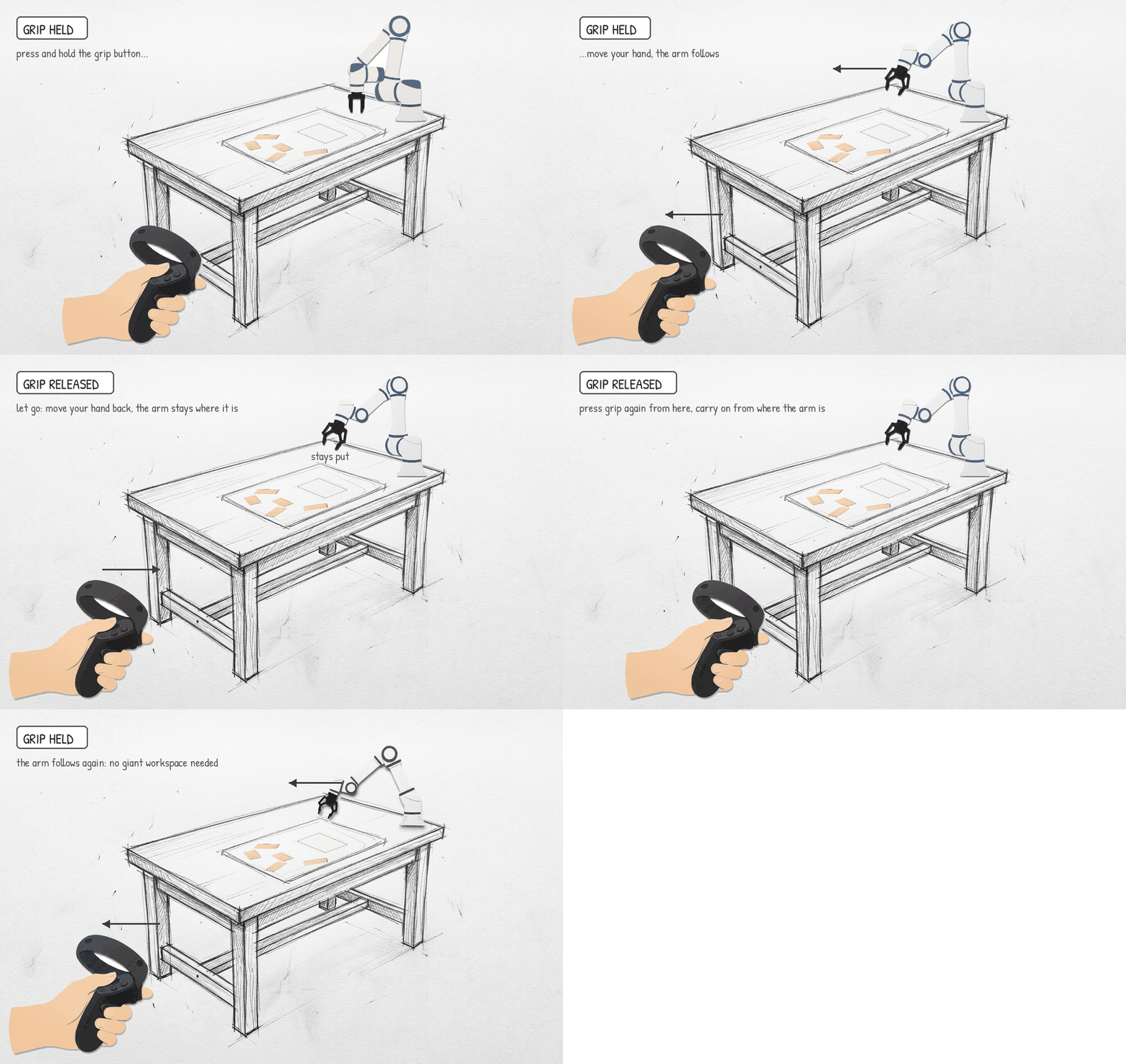
- Clutch: the grip button. Hold it and the arm follows my hand. Let go and the arm freezes while I reposition my own hand. This one idea is what makes teleop usable without a giant workspace.
- Gripper: a
Robotiq 2F-85on the wrist, opened and closed with the trigger. - Eyes: three
Intel RealSensecameras. One on the wrist, one above the workspace, one from the front. - Recorded: everything the robot reports (joint angles, tool position, velocities, gripper state, my commands) alongside all three videos.
The headset is parked on the table, not on my head. I watch the real arm, not a screen.
Building The Recording Software
I built the recording software from scratch with Python, tkinter and Claude.
Funny thing is, I didn’t originally build it for the CS66 at all. I had a parallel project with the Pika Sense UMI from Agilex Robotics that also needed data collection, so the first version was written for that hardware. Then the obvious question: why write a second recorder for the cobot when I already have a tested one, even if it’s for a completely different device?
So I spent a while pulling the Pika-specific bits out and making the software hardware agnostic. I gave it a separate github repository, which can be cloned into any other project and keeps updating by version tracking . Anything project-specific (which streams exist, which adapter reads them, where episodes go) lives in one config file outside the clone.
The hardest part wasn’t the code. It was the layout: figuring out what the pipeline and the interface even needed to do. You genuinely don’t know what you want until you’ve failed a couple of times. Some of mine:
- I didn’t know I needed services that survive an arm restart until every small arm hiccup meant killing everything and waiting for the cameras to re-enumerate and the gripper to re-activate before I could try again. Now Ctrl-C restarts only the arm process. Cameras, gripper and the recorder keep running, and I’m back in teleop in seconds instead of minutes.
- I didn’t know I needed a visual episode browser until I was opening video files one by one to find the episode I wanted to reject. Now there’s a table with a first-frame thumbnail for every episode, and validate, export and archive are just buttons on it.
- I didn’t know I needed version pinning for shared software until a change I made for the Pika rig broke recording on the CS66 the next morning. Each project now pins a tagged version and upgrades on purpose, not by accident.
- And I didn’t know a font could crash a recorder until it segfaulted every single time a fourth camera feed appeared on screen. Days of blaming the cameras, the USB bandwidth, the threading. The cause was a colour emoji font that the UI toolkit could not render. wow. Not a design lesson, but I’ll never forget it.
How It Works
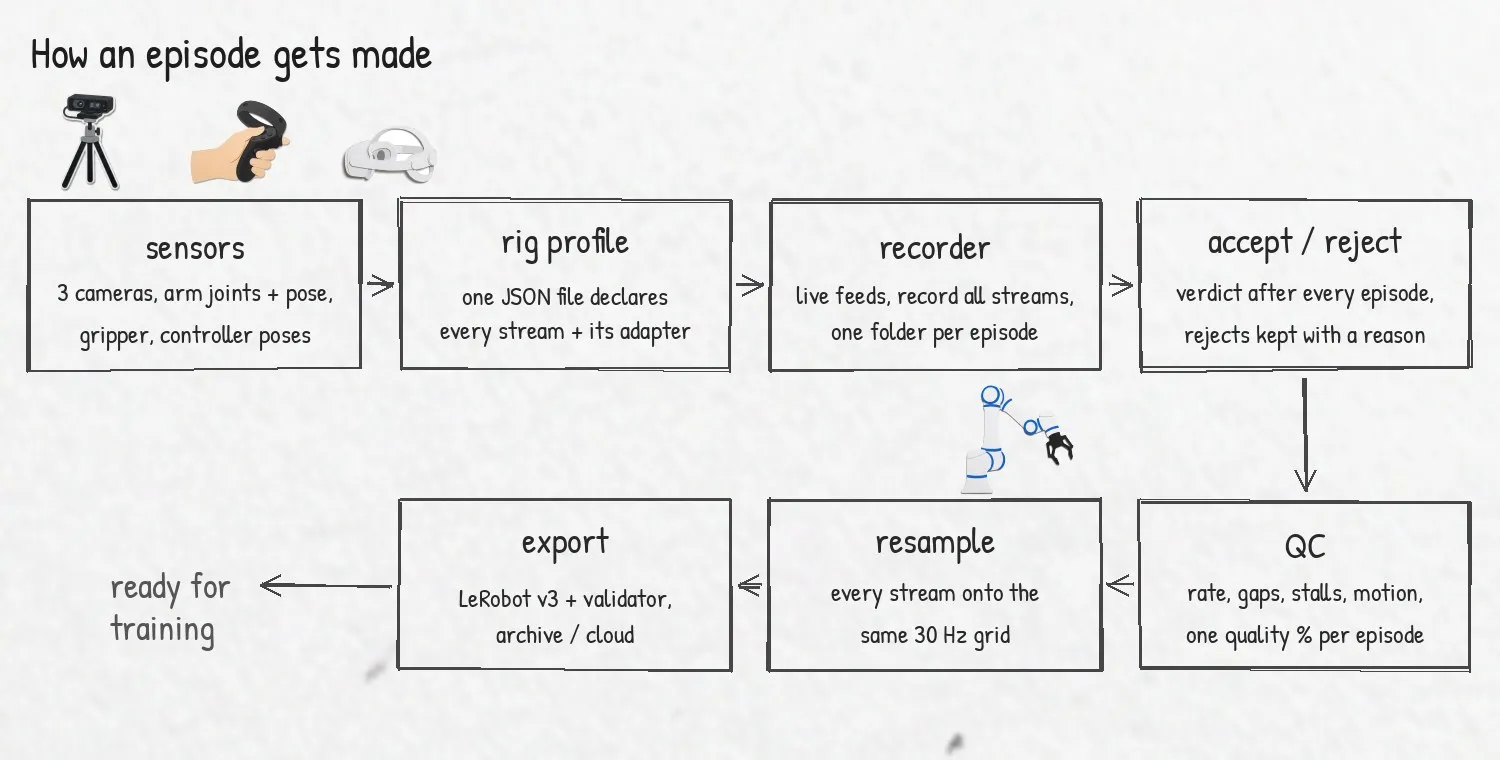
The mental model: anything that produces a stream of values is a sensor, and the recorder doesn’t care what it is.
- A
rig_profile.jsondeclares every stream on the rig: the three cameras, the arm’s joints, pose, gripper and action topics, even the Quest controller poses. - Each stream is read by a small adapter. ROS 2, OpenCV, or a custom one, like the ~180 line adapter I wrote that taps the Quest’s log output without touching the teleop path.
- The recorder UI shows all feeds live, records them simultaneously into one folder per episode, and runs QC the moment I hit accept.
- Everything after that is a disk-side tool working off that episode folder:
- batch QC
- resampling every stream onto a common 30 Hz grid so cameras and robot state line up
- an annotator for marking sub-tasks
- export to
LeRobot v3, the format most VLA training code expects - a validator for the export
- archive and cloud tools so the laptop doesn’t fill up
Onboarding a new sensor means adding a few lines to the profile, not touching UI code. That last part is the whole reason the rewrite was worth it.
Obsessing Over Data Quality
I read a lot about what “good” demonstration data actually looks like. The short version: the model can’t tell a recording glitch from a real motion, so glitches become behaviour.
None of this is visible when you watch the video back. Which is exactly why I didn’t trust myself to catch it by eye.
So every episode gets checked against rules that separate good data from bad, whatever the robot or the task:
- Steady rate. Robot state and cameras arrive at a constant rate with no gaps or stalls. A stalled stream is worse than a slow one, because the model keeps acting on a stale picture.
- Clean values. Time only moves forward, nothing is NaN, and no joint moves faster than the arm physically can. Anything else is a sensor lying.
- Streams in sync. Cameras and robot state line up in time. If one lags behind the other, the model learns to react to the past.
- Something actually happened. The episode is long enough and the arm really moved. A still arm teaches nothing, and I pressed record and got distracted more than once.
- Done the way you want it copied. The task was finished smoothly, without hesitation or restarts. The model imitates everything, including the mistakes.
Each episode gets a quality percentage, weighted by stream, so a dead camera costs a lot and a single dropped frame costs almost nothing. Passing episodes get promoted to a verified_episodes/ folder. Rejected ones go to rejects/ with a reason and are never deleted, because a “bad” episode is often the most useful one to look at later.
My first real episode with all this in place came back at around 95%. Genuinely did not expect that on the first try.
Over time the software kept growing. Where it stands now:
- ~22,000 lines of Python across 36 files in the software repo
- 25 tagged releases in about a month
- a few thousand more lines of project-side code for the CS66 rig
And yes, a lot of that speed is Claude. Being honest: building with Claude is very easy, but you will not finish the task if you don’t understand what it built, line by line. Claude is fast at writing, so I deliberately spent the saved time studying the implementation and the techniques it used. Otherwise I’d be an engineer of prompting, not an engineer.
The Bug That Taught Me The Most
One story, because it captures what this phase is actually like.
Every so often, the moment I pressed the grip button, the arm would lunge about 17 cm in a random direction before settling and following my hand normally. Not every time. Maybe one press in ten. Nobody got hurt, but the gripper was moving at over 1 m/s with no input from me, and you don’t collect data on a robot you don’t trust.
My first three theories were all wrong:
- The smoothing filter. Nope, it converged fine.
- Packet delay from the headset. Nope, packets flowed at full rate the whole time.
- My own hand wobbling. Real, about 2 mm. Nowhere near 17 cm.
What finally cracked it was giving up on theories and logging every raw value, every 8 ms tick, then reading the lines around one lunge by hand.
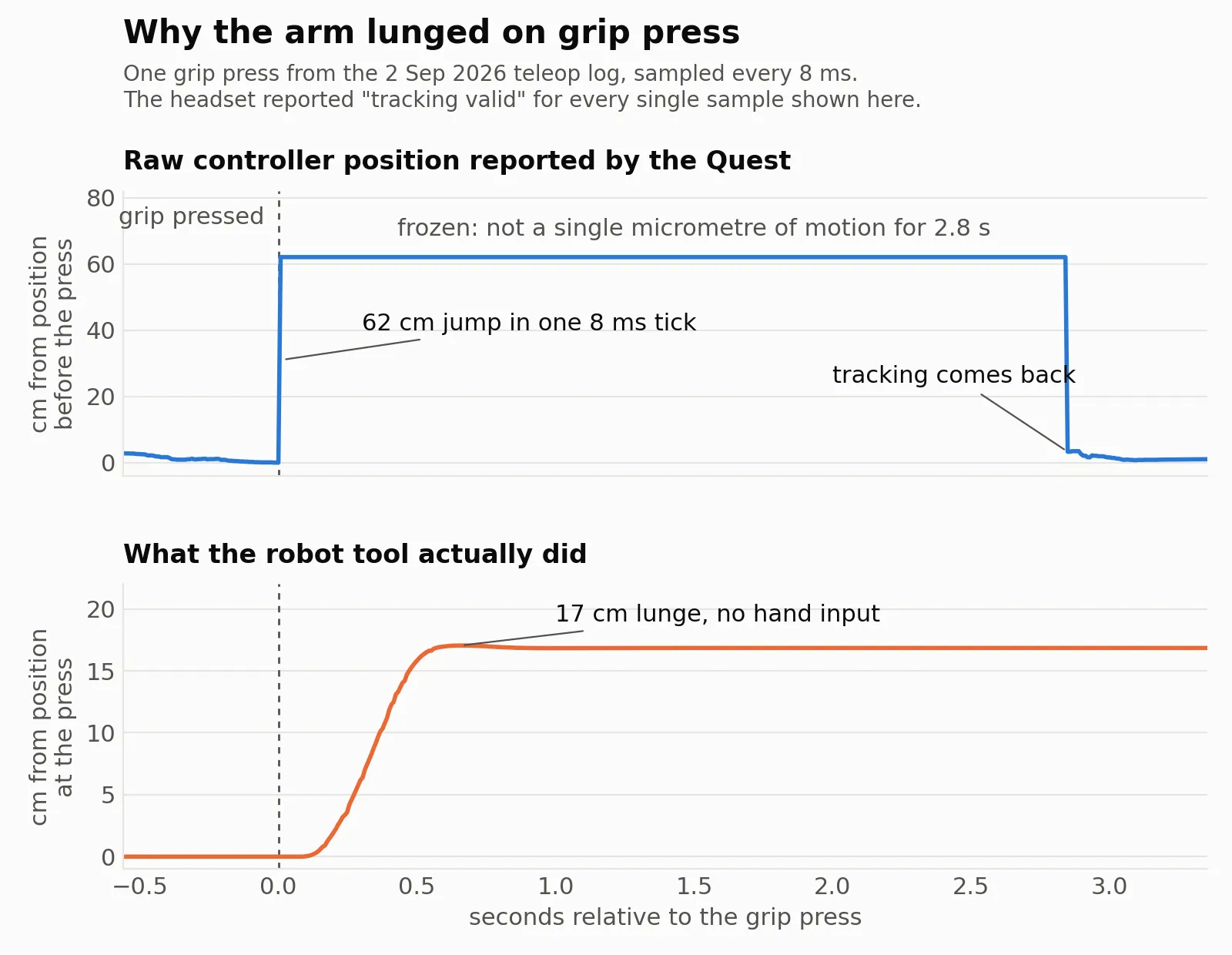
The raw controller position jumped 62 cm in a single tick, sat frozen to the micrometre for a few hundred milliseconds, then jumped back.
That’s a tracking loss. The Quest tracks its controllers with a ring of infrared LEDs, and when I reach my thumb over to press the grip button, my hand covers that ring for a split second. The headset falls back to a guessed position.
And the kicker: the Quest never flags this. Its “tracking valid” field said valid the entire time. My code was trusting a flag that was, for all practical purposes, a constant.
Once the cause was clear the fix was a few lines on the PC side, invisible to the operator. Replaying the same log through the patched code: seven lunges before, zero after.
Don’t trust the status flag. Look at the raw data at tick level before you name a culprit.
Every one of my wrong theories was a plausible story. The CSV was the only thing that couldn’t lie.
A few smaller ones from the same period, for flavour:
- The silent freeze. Grip held, arm not moving a millimetre, PC reporting success on every command. The rotation representation had crossed a full turn and the robot was quietly rejecting everything.
- The stretched dataset. One export played back at a quarter speed: a 54 second episode had become 197 seconds of data, because one tool wrote rows at the robot’s rate and the next tool labelled them as camera rate. Every validator passed, since all they check is that the file agrees with itself. Nothing compared it to the real clock. Internal consistency is not the same as correctness.
- The drifting video. Frame perfect within each episode, 0.04 s late at every episode boundary. Nobody would notice until training crashed on episode 25. I now have a separate check for exactly that.
Where I’m At
All said and done, this phase ended with about 2 hours of qualified data on the CS66, with the formatting and schema sorted out properly along the way (the action stream alone got rewritten twice). It’s a small dataset by any serious standard, and that’s fine. The goal of this phase was a pipeline I trust, and I got that.
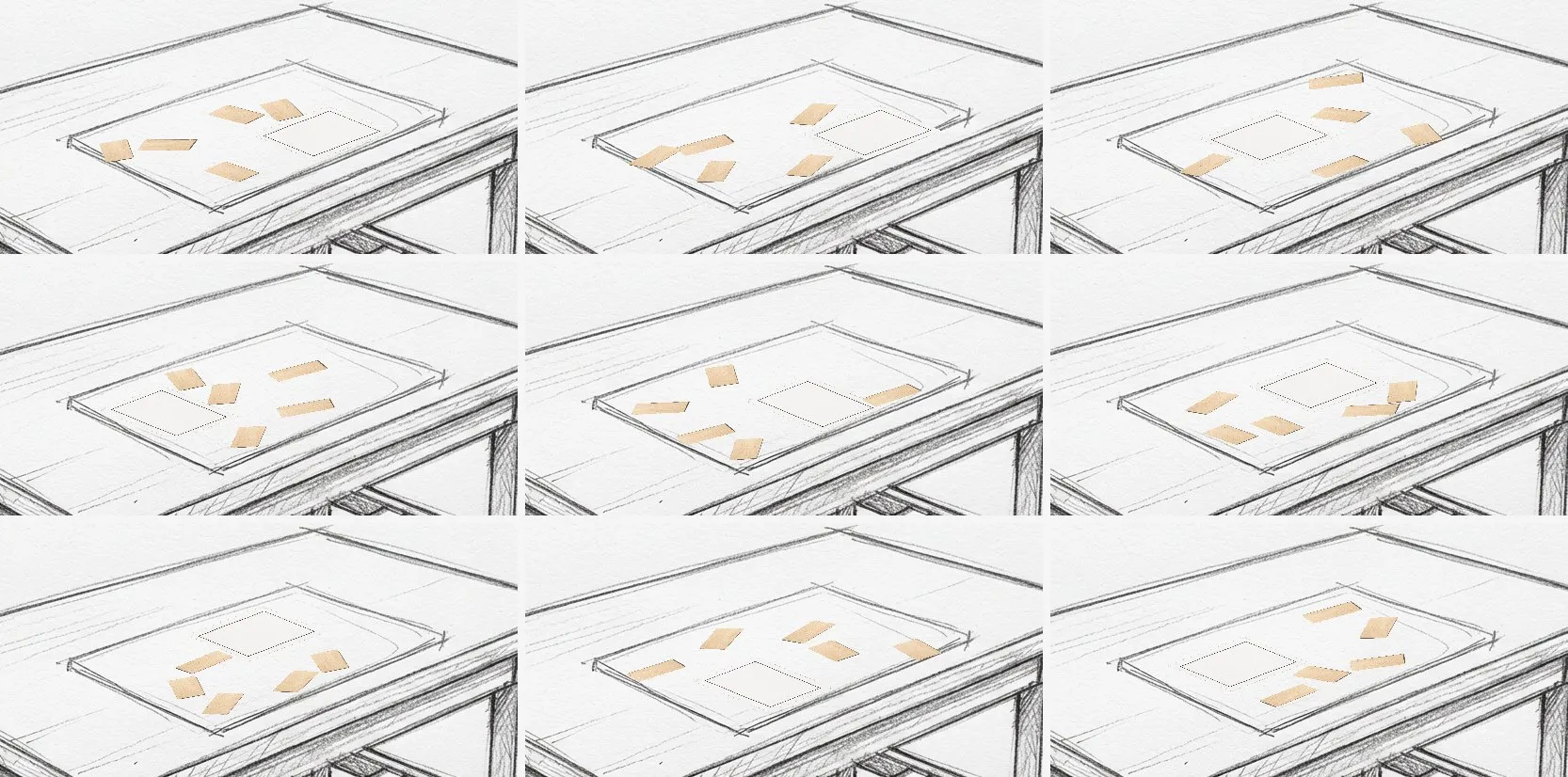
Next came the part I’d been waiting for since the first post: taking this minute amount of data, fine tuning a VLA on it, and deploying the result back on the CS66. Normally I’d end with “I’ll write about it soon”, but since I’m posting late, you don’t have to wait. That story is already up: read the deployment post here.
If you’re building a teleop or data collection setup for your own robot and any of this sounds familiar, I’d love to compare notes. You can contact me here.
Thanks for reading!
See you in the next one!